
Redesigning a Business Website? Keep This URL Checklist
Inventory old URLs, map redirects and check the live sitemap, contact flow and indexing settings when redesigning your business website.
The new homepage looks better. Then someone opens an old product link from a WhatsApp conversation and gets a missing page. That is a migration problem a design preview will not catch. Before changing a business website, write down what must survive the move.
This checklist covers a typical public website redesign. Moving customer accounts, private records or a large product catalogue needs additional planning.
Build the URL list before the old site disappears
Collect URLs from the existing sitemap, navigation, CMS and any search or analytics reports you can access. Include service pages, articles, campaign landing pages and useful downloadable files. Keep a copy with the current title and the decision for each address.
A practical sheet has columns for old URL, purpose, new URL, action and check result. The action may be keep, update, merge or retire. Avoid changing a useful address just to make the redesign feel new; visual changes do not require new slugs.
Map moved pages to relevant replacements
If /salon-booking becomes /services/appointment-booking, a permanent redirect can take visitors to the new booking page. Sending every removed address to the homepage loses the meaning of the old link. A genuinely retired page without a replacement may need a proper missing-page response instead.
Google's site-move guidance describes URL mapping, redirects and monitoring. Search visibility can fluctuate during changes. Treat the migration as work to verify, not as a promise that every position will stay the same.
Separate website hosting from business email
A domain can serve the website and also support email. Before changing DNS, identify which records point to hosting and which belong to mail or other services. Keep a record of the existing configuration and the people who control the accounts.
Do not make an unplanned nameserver change merely because a new host offers a simple setup wizard. Ask the person managing the domain to review the complete record set. Website launch approval should include the email dependencies, even if email itself is outside the development scope.
Check important content on the new pages
Compare service descriptions, contact numbers, prices and opening information with the approved source. A clean design can accidentally hide the information visitors relied on. Check titles, headings and internal links against the page's purpose.
For each page, confirm that the canonical address points to the intended live URL. Review the sitemap for active public pages and inspect indexing directives. A staging site should have controlled access; the live site must not inherit a staging noindex setting by accident.
An observed launch check: read the page without scripts
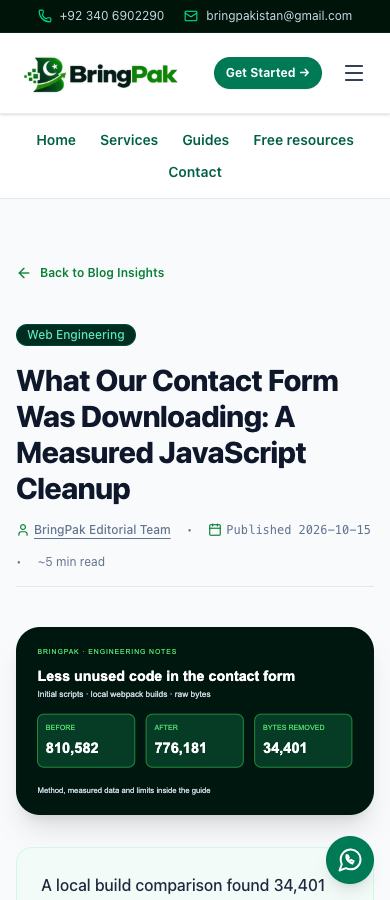
During our own-site review on 15 October 2026, a local production build showed only a loading screen when Chrome's JavaScript was disabled. The article was present in the HTML but hidden inside a streamed container. That difference would be missed by a check that only searched the HTML for the heading.
We limited the loading screen to account pages and added direct navigation and alternatives for interactive tools. In the resulting local check, all 60 public pages had a visible main heading and readable main text at a 390-pixel width, with no detected horizontal overflow. These are observations from BringPak's site, not client results.
Compare the before screenshot and after screenshot, or read the method and recorded checks. The screenshots use a 390 by 900 viewport; the full page inventory check uses a 390 by 844 viewport.

Ask your developer which content, navigation and contact routes remain usable if scripts fail. Interactive forms and calculators may still need JavaScript and should explain their alternatives. This browser check does not reproduce a search crawler or establish indexing, rankings or sales. It complements a normal interactive launch test.
Run a launch rehearsal
- Open a sample of old URLs directly, including links outside the main menu.
- Follow the redirect and confirm the destination answers the same need.
- Test navigation and images on a narrow mobile screen.
- With permission, submit a labelled enquiry and trace its storage and notification.
- Check phone, WhatsApp and download links.
- Confirm who can restore the previous deployment if a critical fault appears.
Keep the result beside each URL in the migration sheet. “Redirect exists” is incomplete if it leads to another redirect, an irrelevant page or an error. Use the exact live hostname when checking, because staging behaviour does not prove production behaviour.
Monitor after the switch
Keep the old URL inventory and compare it with new missing-page reports. Review Search Console if you have access, and investigate important URLs that are not being served or indexed as intended. Submit the live canonical sitemap after verifying it.
Use comparable periods when reviewing enquiries and search traffic. A changed traffic number can reflect demand, tracking changes or a migration fault; do not assign a cause without checking. Record substantial content changes separately from the launch date.
For the project scope, see BringPak website redesign. For the work after handover, read the monthly maintenance checklist. Send your existing site and URL inventory through our enquiry page to discuss the move.
Useful for another business owner?
Share this guide with someone working on the same website or business workflow.
Share on WhatsAppContinue reading
Have a workflow you want to improve?
Send your current website or process, the problem you want to fix and the tools your team uses.
Discuss Your Project